Learn with the Full QGIS Masterclass
If you are looking to gain both essential and advanced QGIS skills for hydrological and environmental analysis, register for the QGIS Masterclass.
This nested course begins with the fundamentals, reinforcing core hydrological GIS workflows before progressing into advanced spatial techniques. Participants move beyond preprocessing and mapping into catchment geometry, morphometric analysis, time‑of‑concentration calculations, unit hydrograph derivation, and automation using plugins, graphical models, and PyQGIS. Enjoy 90 days of access and learn at your own pace.
Explore full details and register for the QGIS Masterclass.
Prefer to focus on the essentials for now? See full course details for QGIS Essentials for Water Modelling below and register to get started.
Course Overview
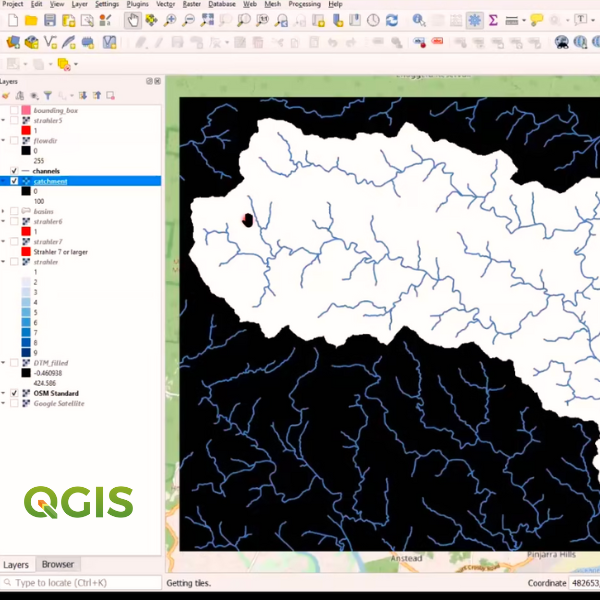
This course introduces participants to the core GIS skills needed for hydrological analysis. The course covers flow‑direction modelling, stream network extraction, catchment delineation, and clear map production. Participants build a reliable, repeatable workflow for turning raw elevation data into meaningful hydrological outputs ready for analysis and reporting.
Learning Outcomes
In this course, you will be able to:
- Generate flow‑direction layers using PCRaster Tools and understand the theory behind flow routing.
- Derive stream networks, calculate Strahler orders, and map catchments and subcatchments.
- Style hydrological GIS layers for clarity and communication.
- Create professional map layouts, including locator maps and advanced shapeburst fills.
Course Outline
Part 1: Getting started with QGIS for Hydrology
- Theoretical background.
- Installing the PCRaster Tools plugin.
- Calculating the flow direction.
- Styling the flow direction in 2D and 3D.
Part 2: Derive the Stream Network and Delineate a Catchment
- Calculate Strahler Orders.
- Calculate flow accumulation.
- Calculate channel network.
- Delineate catchment and subcatchments.
Part 3: Craft a Catchment Map
- Styling GIS data.
- Creating an inverted polygon shapeburst fill.
- Setting up the print layout.
- Creating a locator map.
Format
- 6+ hours of session recordings with unlimited access for 30-days;
- Pre-and-post-course materials to go through via the AWS learning platform.
- Homework exercises between the 3 parts.
- Additional resources and working model download/s.
- Ability to ask questions to the presenters at any time through the learning platform.
Requirements
- Windows 11 OS is recommended.
- A computer with at least 8GB RAM (16GB recommended).
- A good internet connection.
- QGIS 3.44.X to introduce you to the latest functionalities available from the Long Term Release (LTR): https://qgis.org/download/
Pre-requisites
- A basic knowledge of GIS, QGIS and hydrology is recommended but not essential.
Completion Certification
- Participants earn CPD hours/points (i.e. with Engineers Australia) for at least 6 hours for the entire course.
- On completion of the course participants will be issued with an official QGIS Certificate.
Build deeper capability in hydrological and environmental GIS with our suite of QGIS courses. From hydrological preprocessing and catchment analysis to field data collection and full‑workflow modelling, these courses give practitioners the tools, plugins, and spatial methods needed for real‑world applications.
In this three-part course learn how to build, run, and interpret groundwater models using QGIS tools. This course guides you through conceptualisation, model setup, boundary conditions, calibration, and visualisation, giving you a practical workflow for assessing aquifer behaviour and supporting groundwater‑related decisions.
This three-part course provides hands-on training on how to work confidently with mesh layers for hydrodynamic, coastal, and environmental modelling. This course covers loading, styling, analysing, and animating mesh datasets, giving you practical skills to interpret model outputs and create clear, decision‑ready visualisations.
In this three-part course learn how to streamline repetitive tasks and build custom geospatial workflows using PyQGIS. This course introduces scripting fundamentals, automation patterns, and practical examples that help you scale your GIS processes and boost productivity in QGIS.
Learn how to process, filter, and visualise LiDAR and drone‑derived point clouds in QGIS. This three-part course covers WebODM, 3D tools, elevation profiling, and PDAL‑based automation, giving you practical skills to create hydrologically relevant surfaces and high‑quality elevation products.
Refund Policy
Frequently Asked Questions (FAQ)